01
Add your printer
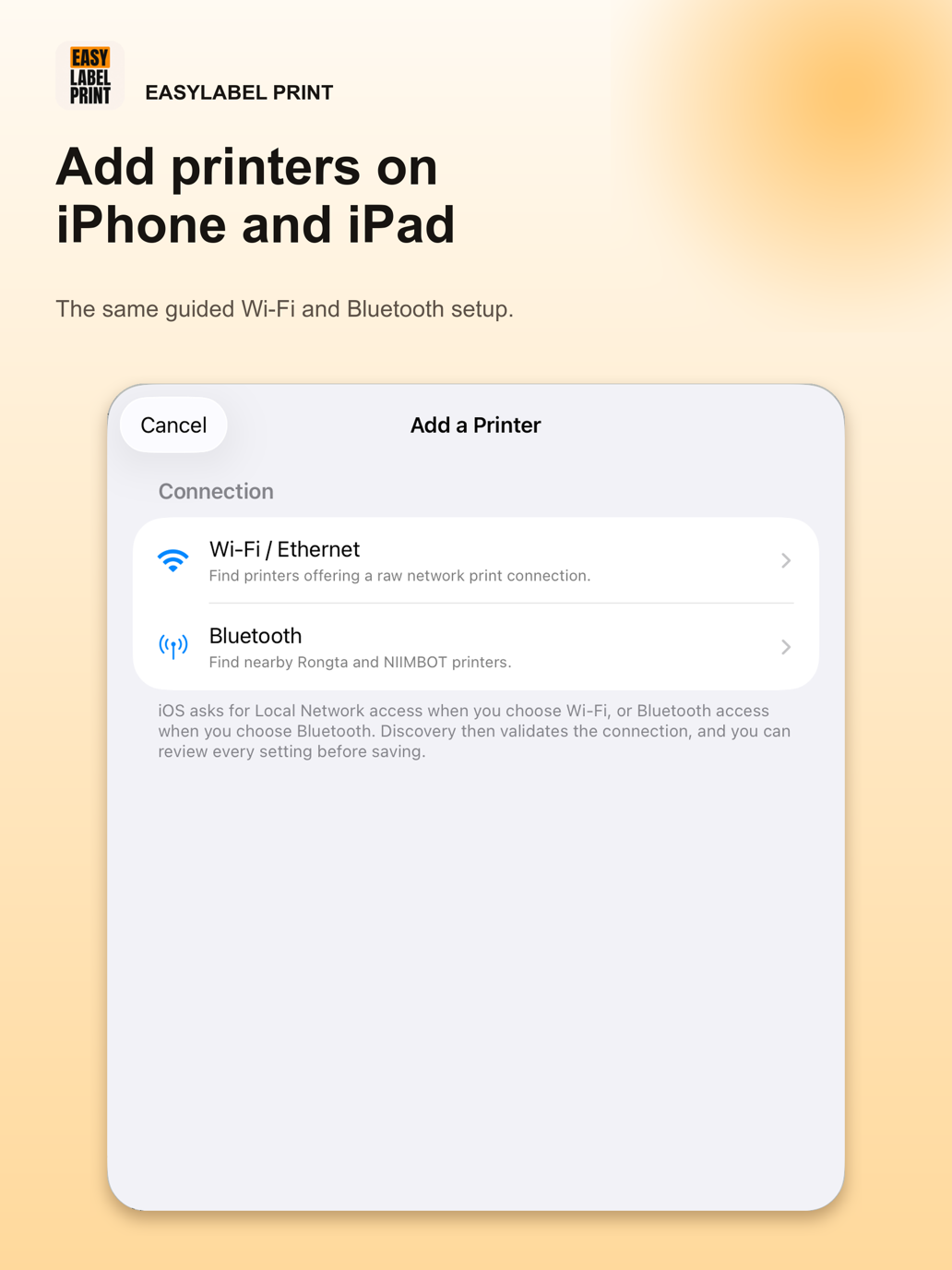
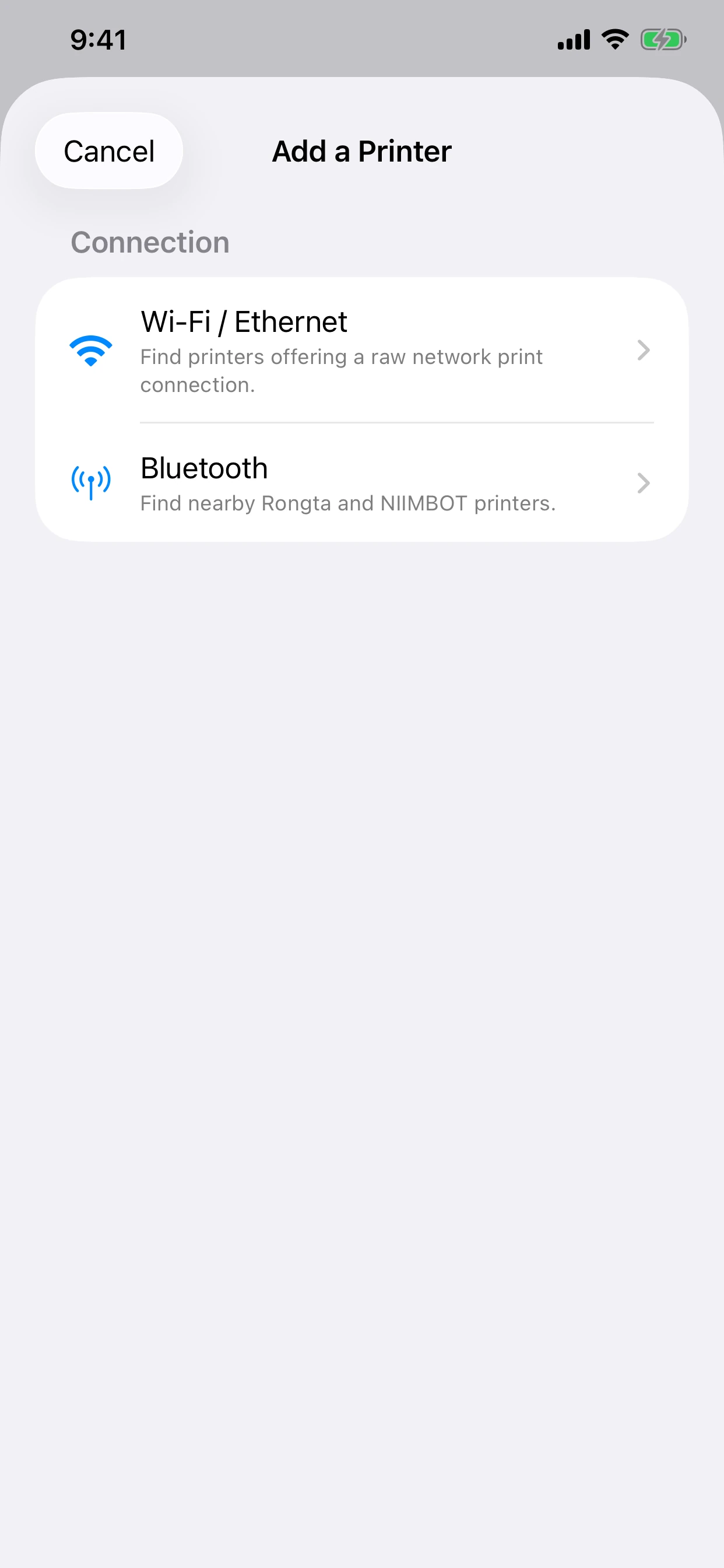
Choose Wi-Fi / Ethernet or Bluetooth. Allow local-network and nearby-device access when asked so EasyLabel Print can discover nearby printers.
 EasyLabel Print
EasyLabel Print sends shipping labels, PDFs, and images from Android, iPhone, and iPad directly to compatible Wi-Fi, Ethernet, and Bluetooth thermal printers—without a print server.
Choose Wi-Fi / Ethernet or Bluetooth. Allow local-network and nearby-device access when asked so EasyLabel Print can discover nearby printers.
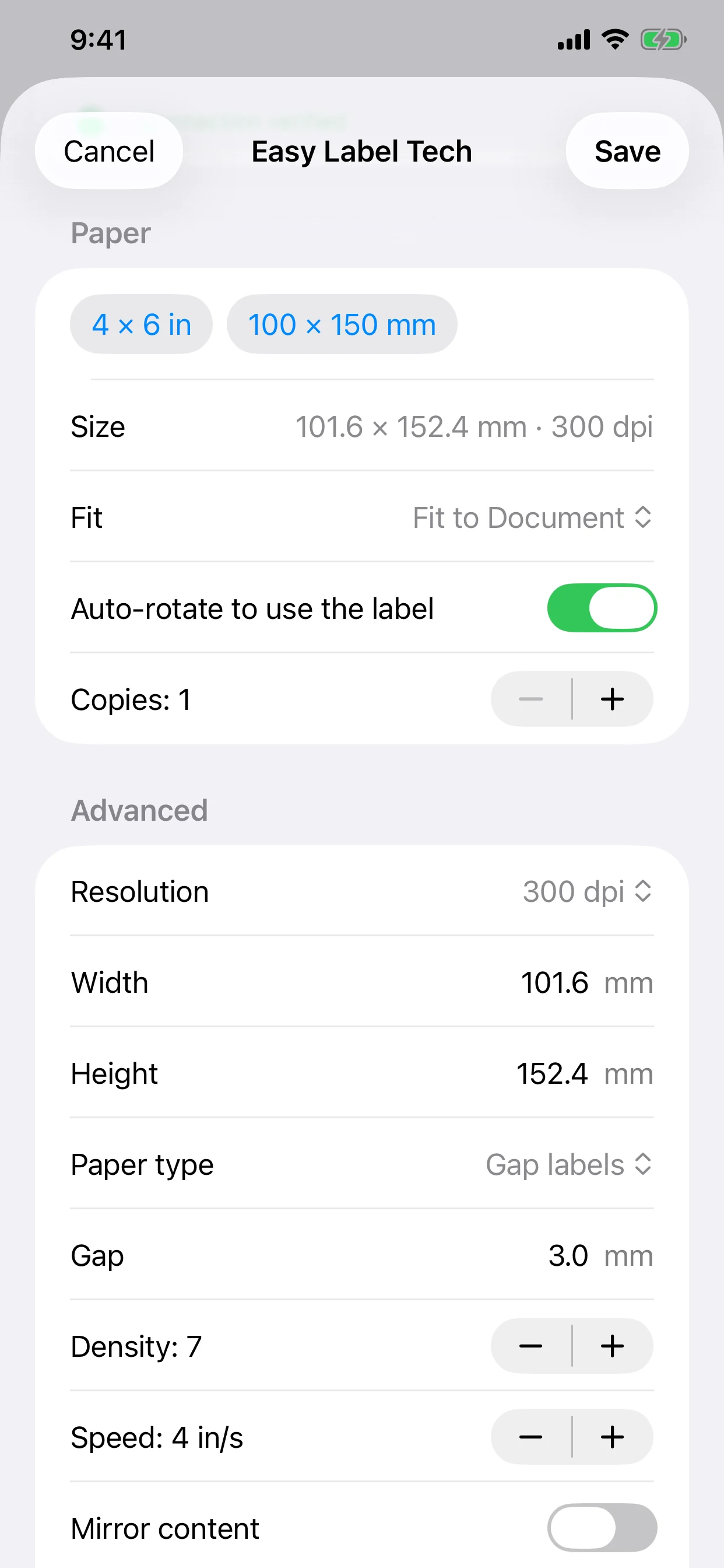
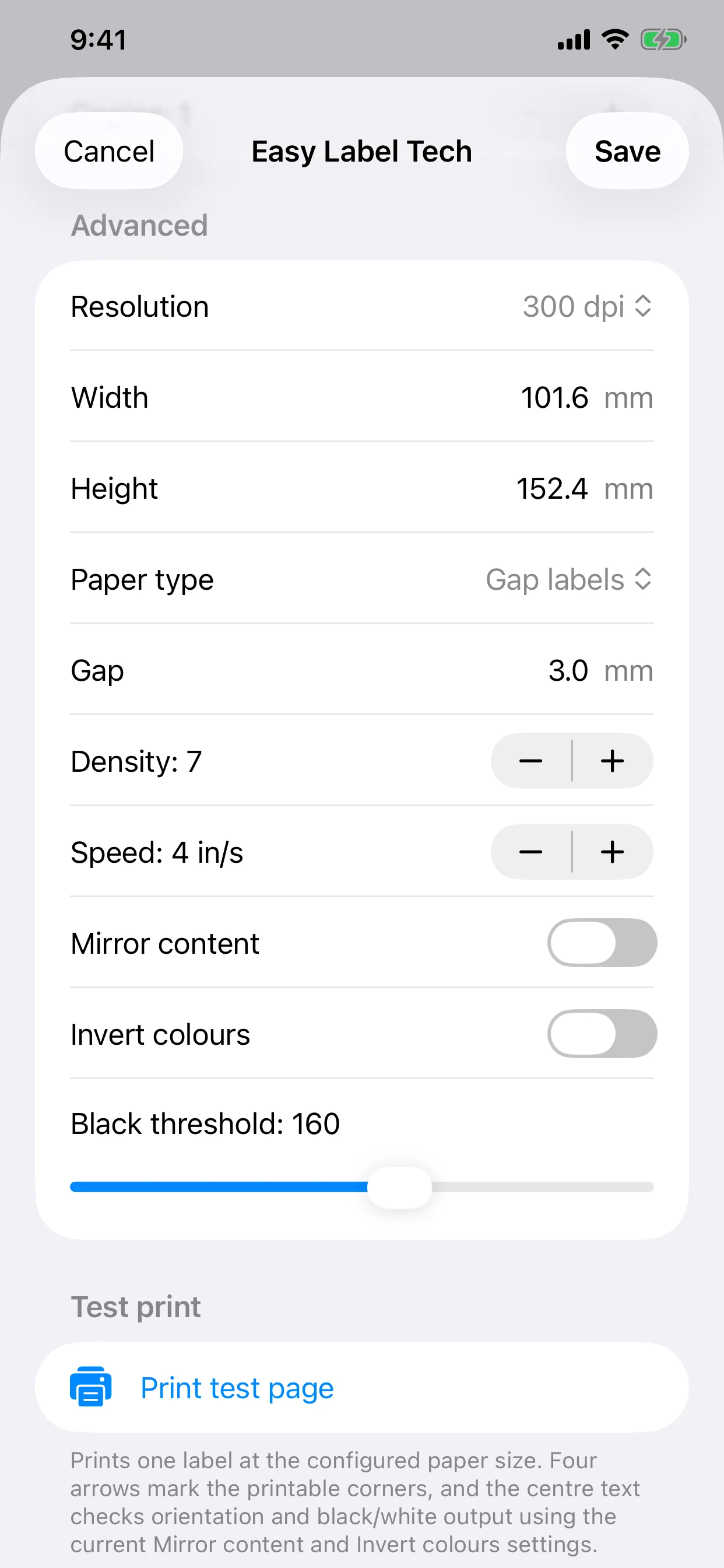
Set the protocol, label size, resolution, orientation, density, mirroring, and colour inversion for your printer.
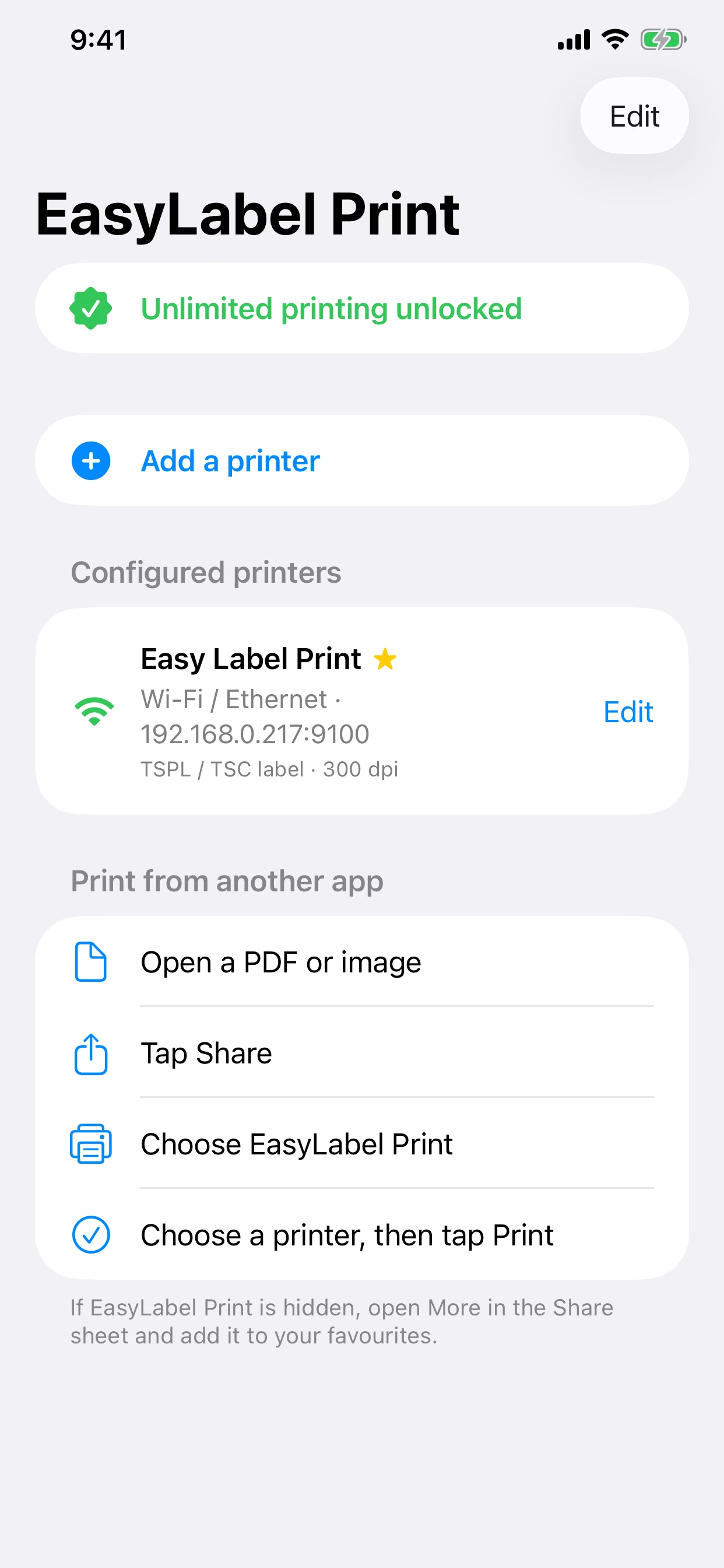
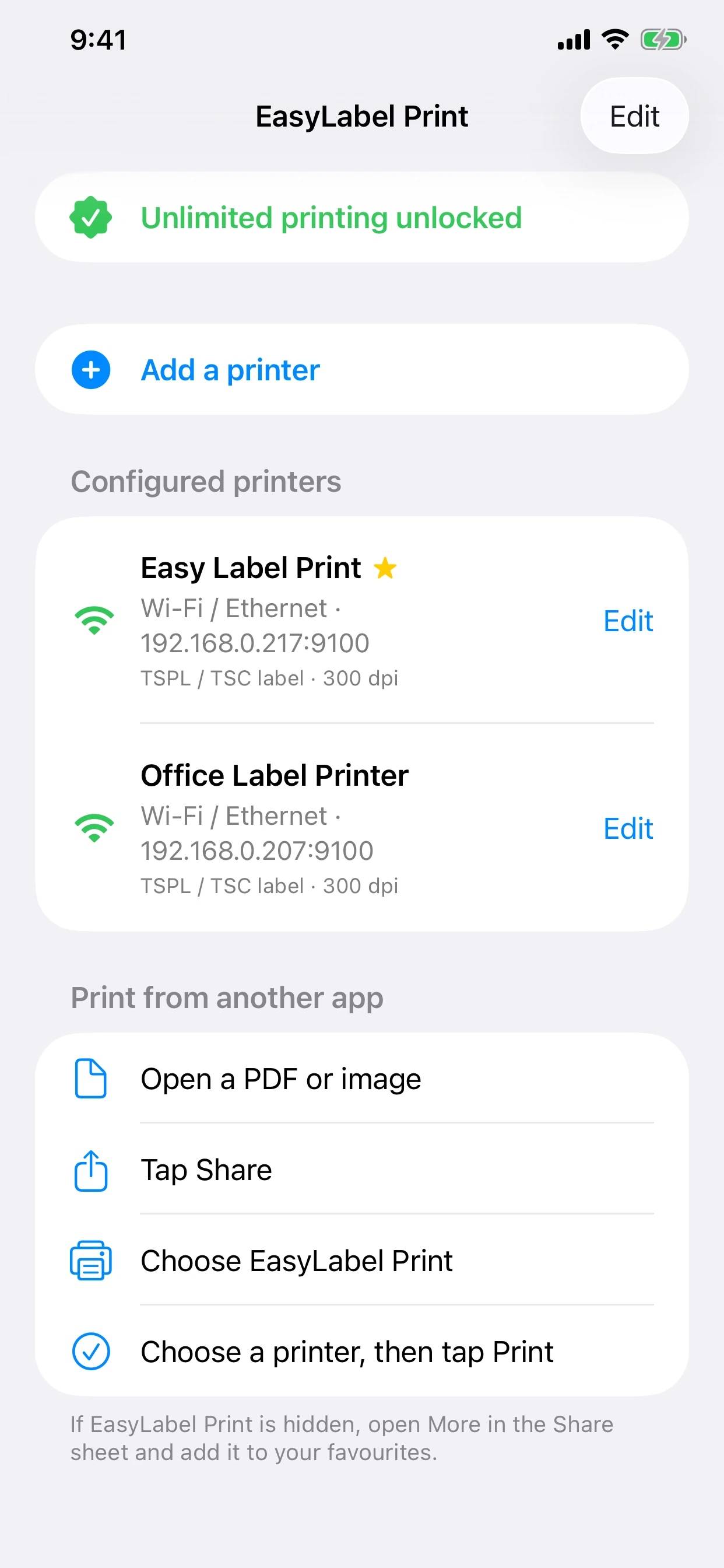
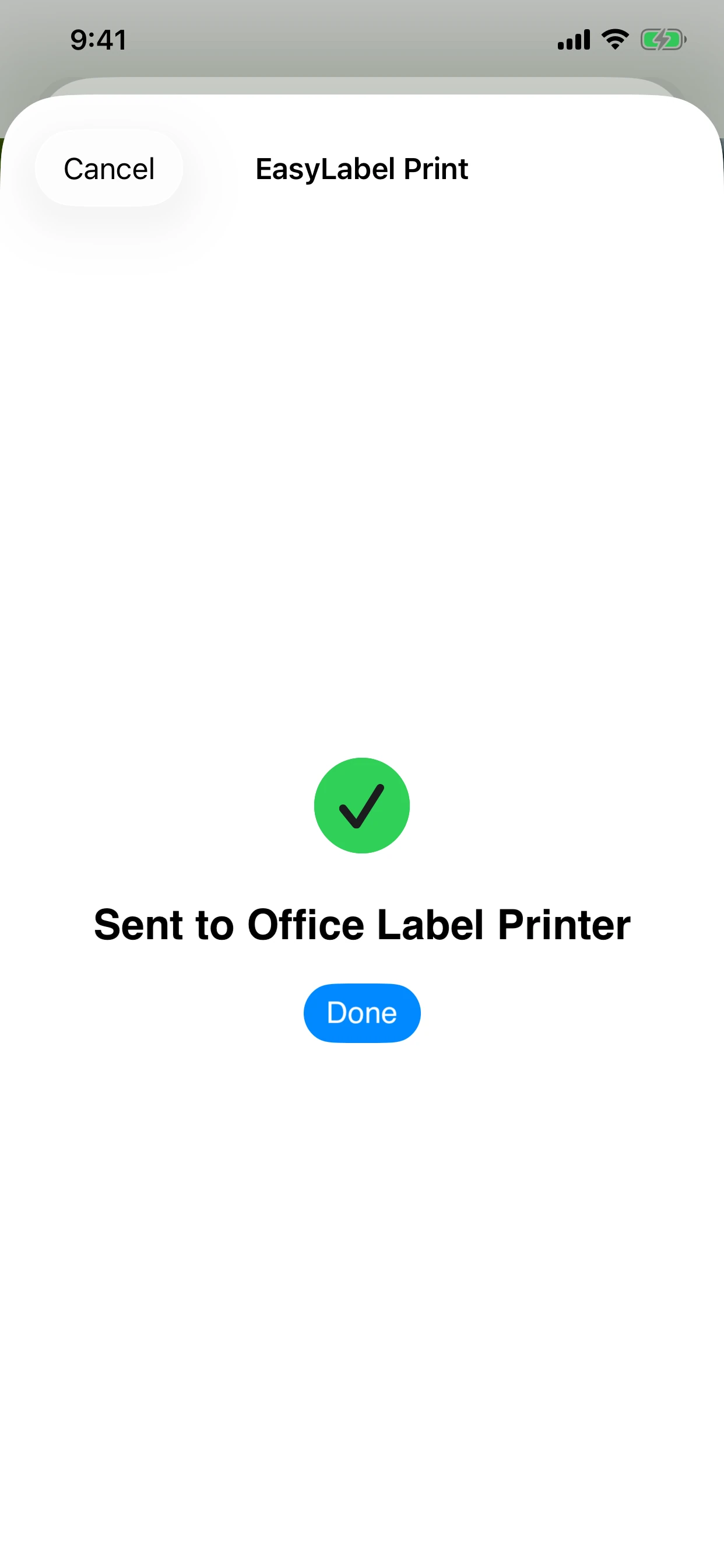
Open a PDF or image, tap Share, choose EasyLabel Print, select your printer, and tap Print.
Eleven current EasyLabel Print screens take you from a freshly installed app through configuration, testing, saving your first printer, adding another, and sending a successful print job.
The same guided Wi-Fi and Bluetooth setup adapts naturally to either device.
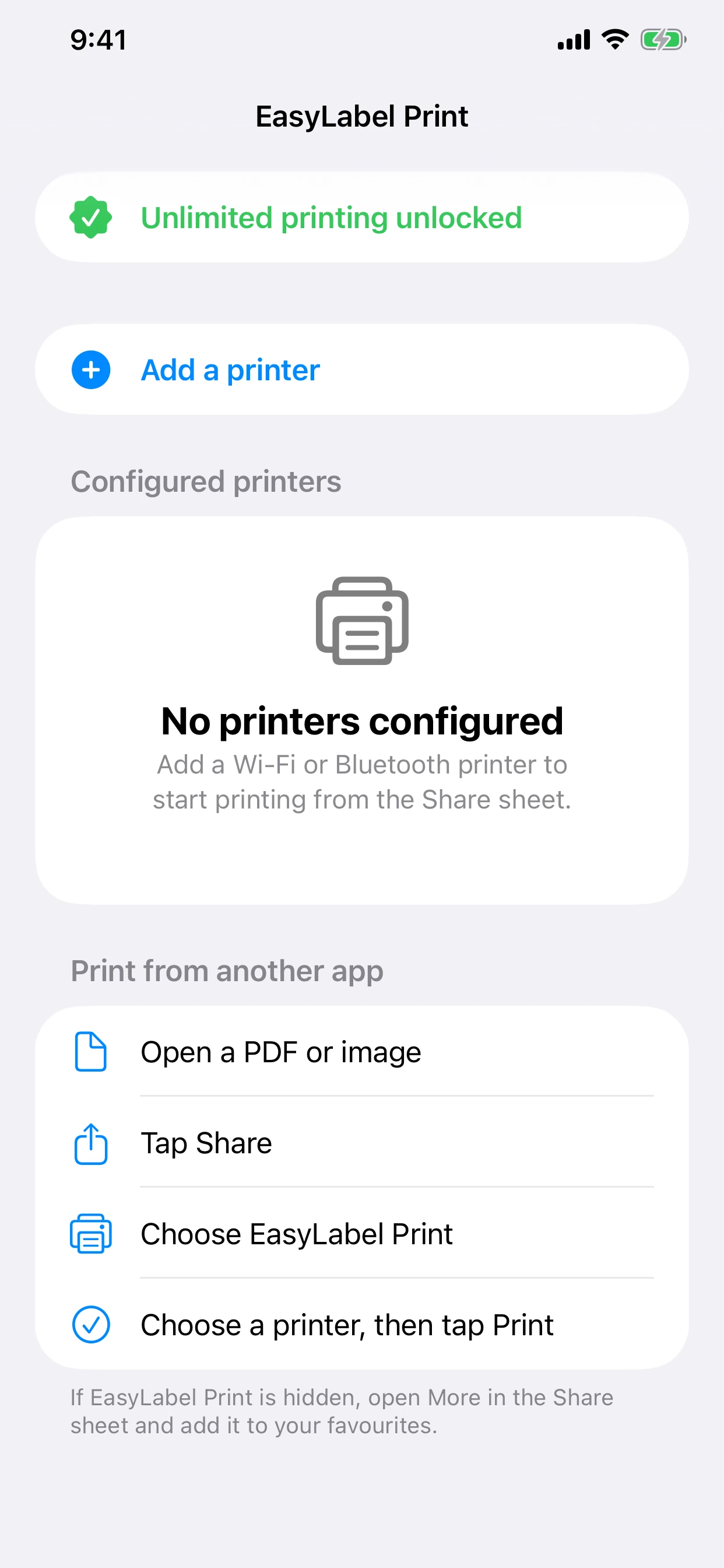
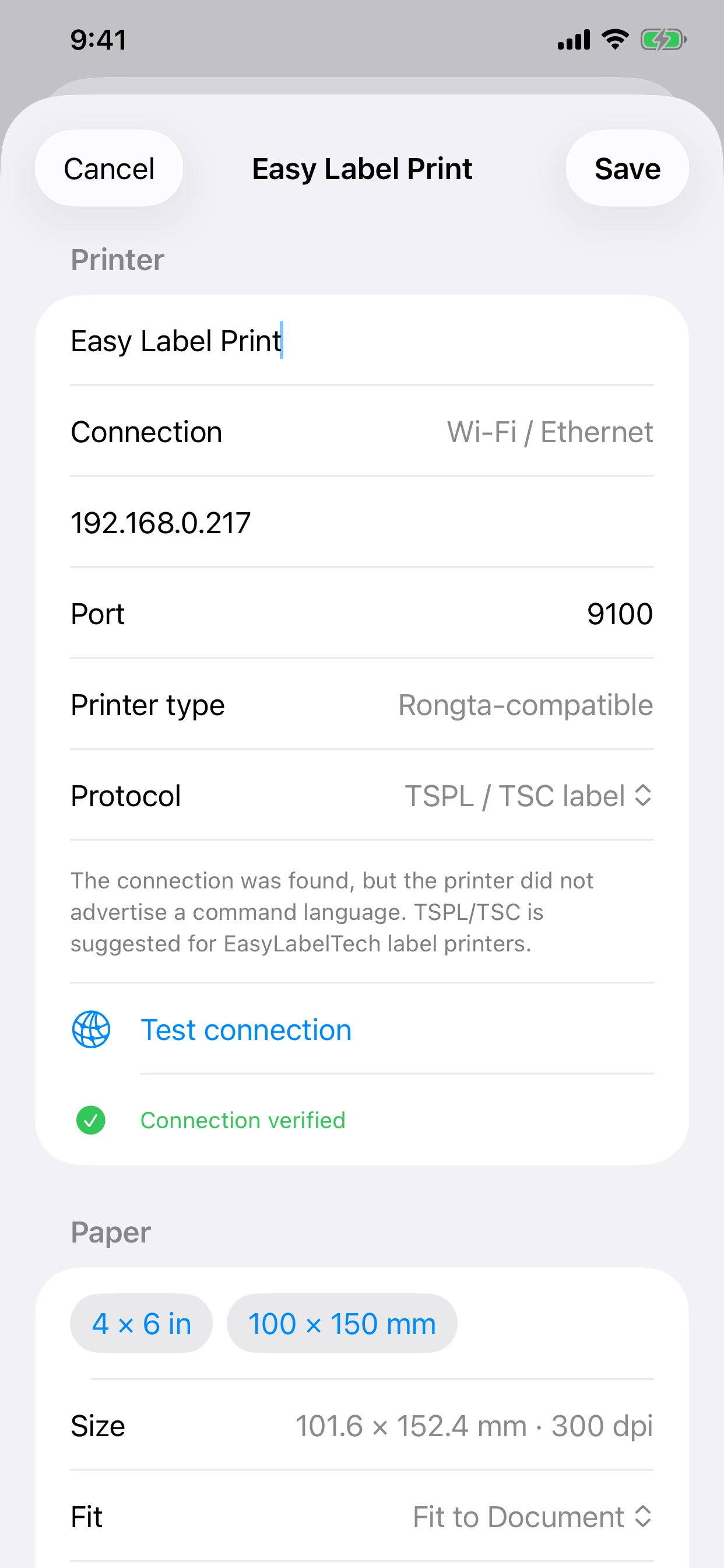
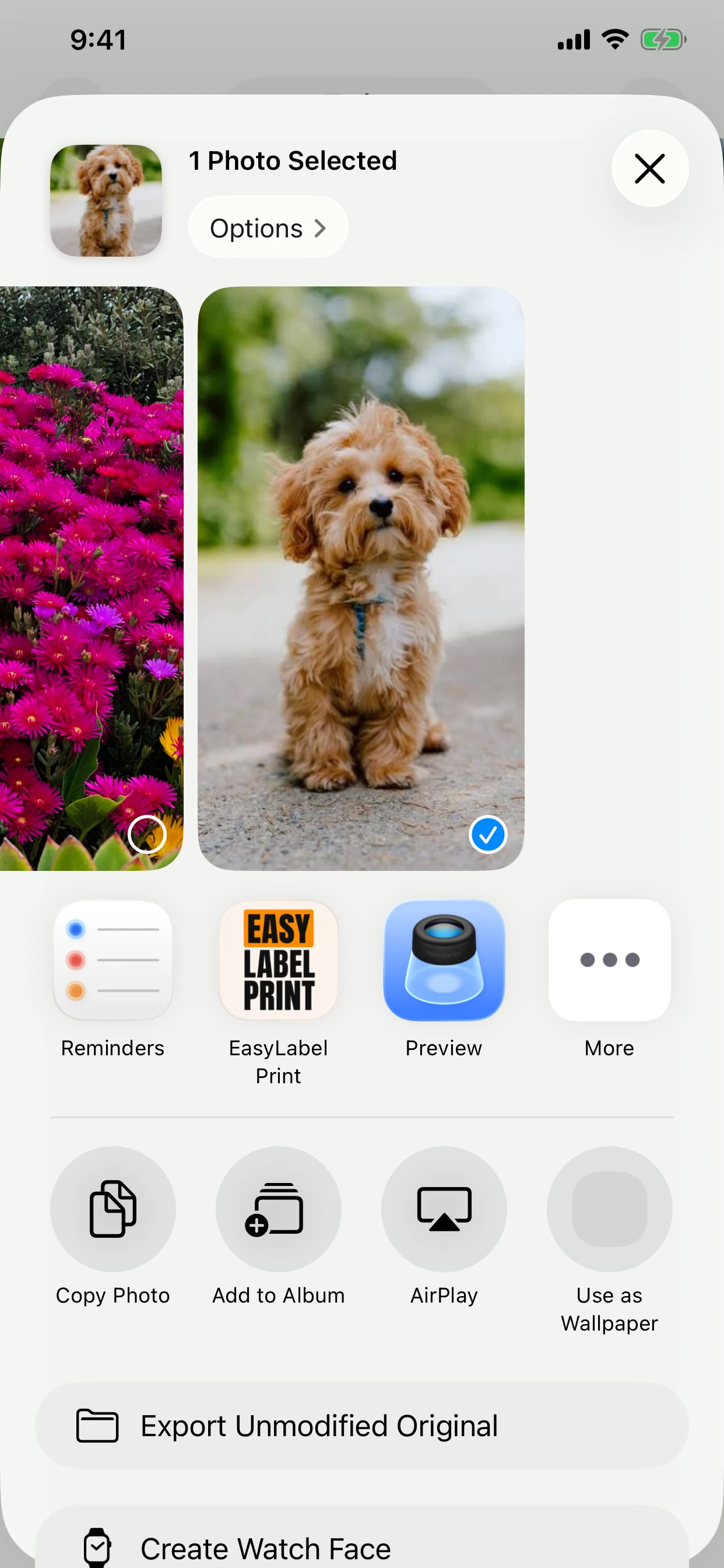
Scroll to the end of the app row, tap More, then add EasyLabel Print to your favourites. Some apps only share links or text; download the PDF or image first, then share the saved file.
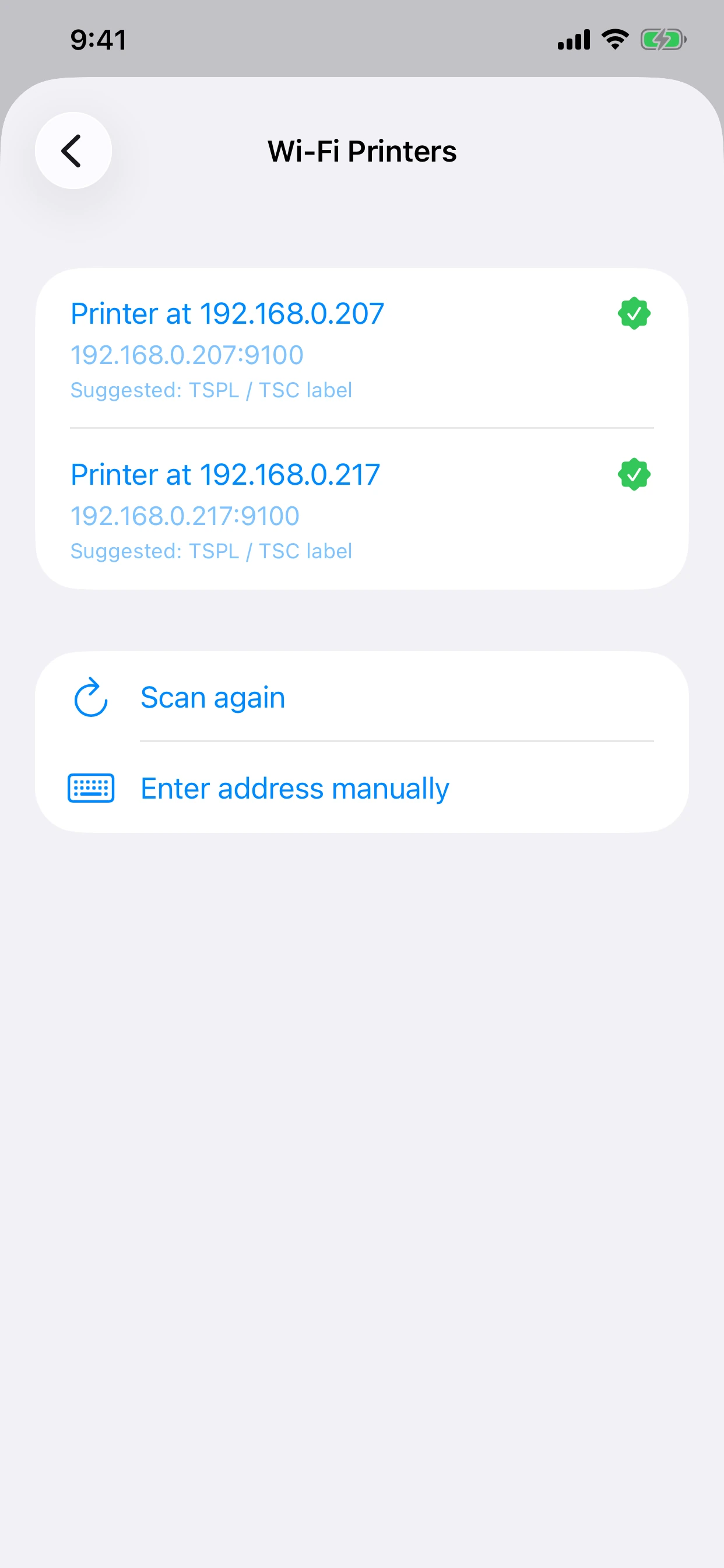
Make sure the iPhone or iPad and printer are on the same local network. Confirm Local Network access in iOS Settings, then scan again or enter the printer address manually.
Turn on Bluetooth, allow EasyLabel Print to find Bluetooth devices, and keep the printer nearby. Some Bluetooth printers require their vendor app for initial pairing.
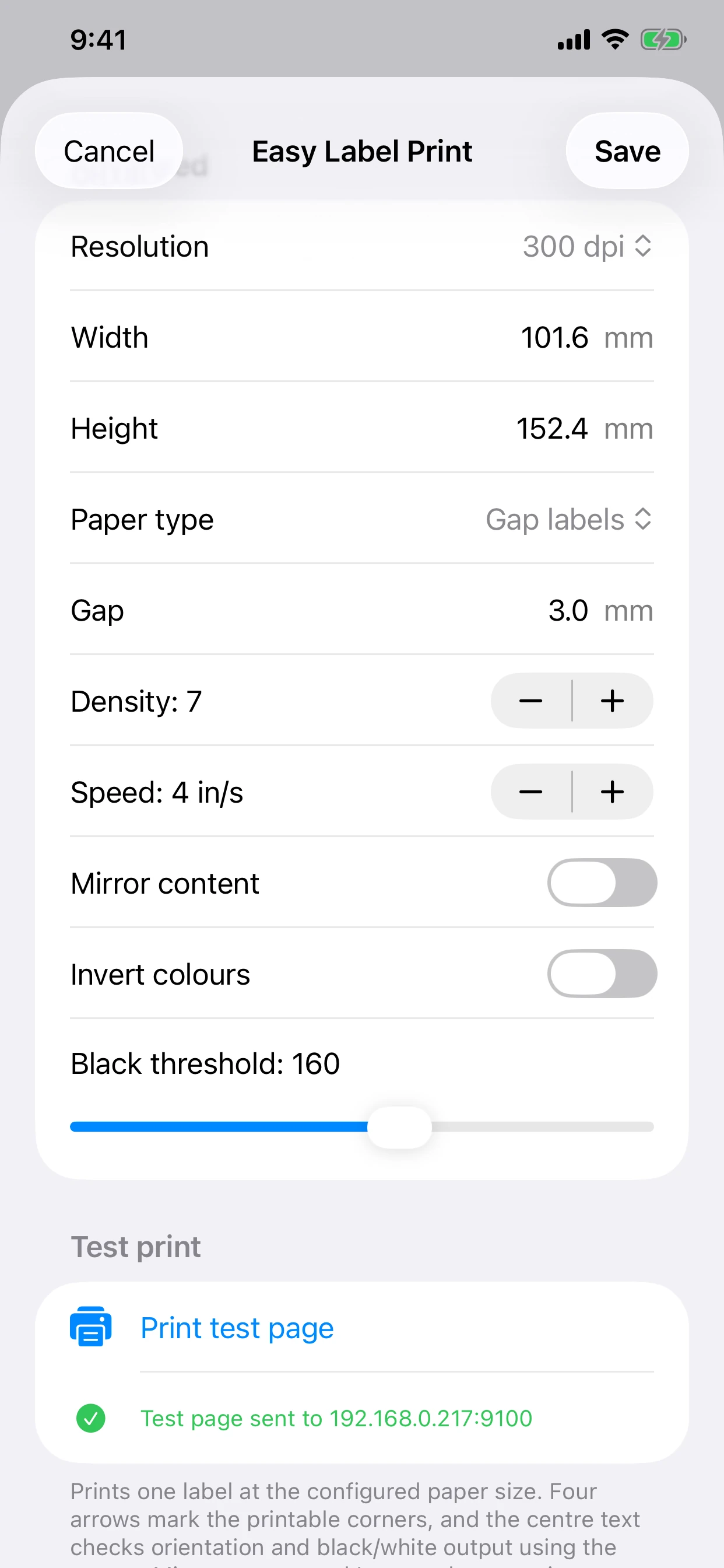
Open the printer configuration and review Fit, auto-rotate, mirror, and invert settings. After Test connection succeeds, use Print test page to confirm that all four inset corner targets land on the label.
Open EasyLabel Print while signed in to the same App Store account. The non-consumable purchase can be restored without being charged again.
Choose how the printer connects, then check its exact model, resolution, printer language, protocol, and evidence level. Only profiles with a viable iPhone or iPad direct-print path are listed; guarded Beta profiles still require a successful owner test.
The printer and iPhone or iPad must be connected to the same local network.
| Brand and model | Resolution | Printer language | Connection and protocol | Status | OS testing |
|---|---|---|---|---|---|
| EasyLabelTech RP410 300 dpi Wi-Fi | 300 dpi | TSPL / TSC | Wi-Fi / Ethernet raw network printingRaw TCP, normally port 9100 | Physically tested | iOS: Published status · not separately recordedAndroid: Published status · not separately recorded |
| EasyLabelTech Mini 300 dpi Wi-Fi | 300 dpi | TSPL / TSC | Wi-FiRaw TCP, normally port 9100 | Beta · direct printing available | iOS: Published status · not separately recordedAndroid: Published status · not separately recorded |
| EasyLabelTech 410 203 dpi Wi-Fi | 203 dpi | TSPL / TSC | Wi-FiRaw TCP, normally port 9100 | Beta · direct printing available | iOS: Published status · not separately recordedAndroid: Published status · not separately recorded |
| Rongta RP421A 300 dpi network variant | 300 dpi | TSPL / TSC | Ethernet or Wi-FiRaw TCP, port 9100 | Beta · direct printing available | iOS: Published status · not separately recordedAndroid: Published status · not separately recorded |
| Rongta RP410 203 dpi | 203 dpi | TSPL + ESC; ZPL + ESC also documented | Bluetooth or Ethernet-equipped variantRongta Bluetooth serial service or raw TCP on the network variant | Beta · direct printing available | iOS: Published status · not separately recordedAndroid: Published status · not separately recorded |
| AUSPRINT PRO 300 dpi Wi-Fi | 300 dpi | TSPL / TSC Rongta-family profile | Wi-FiRaw TCP after endpoint confirmation | Beta · direct printing available | iOS: Published status · not separately recordedAndroid: Published status · not separately recorded |
| Rongta RP420 | 203 dpi | TSPL / TSC | Wi-Fi or Ethernet-equipped network variantRaw TCP, normally port 9100 | Beta · direct printing available | iOS: Published status · not separately recordedAndroid: Published status · not separately recorded |
| Rongta RP310D | 203 dpi | TSPL / TSC | Wi-Fi or Ethernet-equipped network variantRaw TCP, normally port 9100 | Beta · direct printing available | iOS: Published status · not separately recordedAndroid: Published status · not separately recorded |
| Zebra ZD421 (203 dpi) | 203 dpi | ZPL | Wi-Fi or Ethernet-equipped network variantRaw TCP ZPL | Beta · direct printing available | iOS: Published status · not separately recordedAndroid: Published status · not separately recorded |
| Zebra ZD421 (300 dpi) | 300 dpi | ZPL | Wi-Fi or Ethernet-equipped network variantRaw TCP ZPL | Beta · direct printing available | iOS: Published status · not separately recordedAndroid: Published status · not separately recorded |
| Zebra ZD621 (203 dpi) | 203 dpi | ZPL | Wi-Fi or Ethernet-equipped network variantRaw TCP ZPL | Beta · direct printing available | iOS: Published status · not separately recordedAndroid: Published status · not separately recorded |
| Zebra ZD621 (300 dpi) | 300 dpi | ZPL | Wi-Fi or Ethernet-equipped network variantRaw TCP ZPL | Beta · direct printing available | iOS: Published status · not separately recordedAndroid: Published status · not separately recorded |
| Zebra ZT411 (203 dpi) | 203 dpi | ZPL | Wi-Fi or Ethernet-equipped network variantRaw TCP ZPL | Beta · direct printing available | iOS: Published status · not separately recordedAndroid: Published status · not separately recorded |
| Zebra ZT411 (300 dpi) | 300 dpi | ZPL | Wi-Fi or Ethernet-equipped network variantRaw TCP ZPL | Beta · direct printing available | iOS: Published status · not separately recordedAndroid: Published status · not separately recorded |
| Zebra ZQ511 / ZQ521 | 203 dpi | CPCL | Wi-Fi or Ethernet-equipped network variantRaw TCP CPCL | Beta · direct printing available | iOS: Published status · not separately recordedAndroid: Published status · not separately recorded |
| Zebra ZQ610 / ZQ620 / ZQ630 Plus | 203 dpi | CPCL | Wi-Fi or Ethernet-equipped network variantRaw TCP CPCL | Beta · direct printing available | iOS: Published status · not separately recordedAndroid: Published status · not separately recorded |
| TSC DA220 / TX210 / TC200 / TE200 | 203 dpi | TSPL / TSC | Wi-Fi or Ethernet-equipped network variantRaw TCP TSPL | Beta · direct printing available | iOS: Published status · not separately recordedAndroid: Published status · not separately recorded |
| TSC DA320 / TX310 / TC300 / TE300 | 300 dpi | TSPL / TSC | Wi-Fi or Ethernet-equipped network variantRaw TCP TSPL | Beta · direct printing available | iOS: Published status · not separately recordedAndroid: Published status · not separately recorded |
| TSC TE210 / TC210 / TH240 | 203 dpi | TSPL / TSC | Wi-Fi or Ethernet-equipped network variantRaw TCP TSPL | Beta · direct printing available | iOS: Published status · not separately recordedAndroid: Published status · not separately recorded |
| TSC TE310 / TC310 / TH340 | 300 dpi | TSPL / TSC | Wi-Fi or Ethernet-equipped network variantRaw TCP TSPL | Beta · direct printing available | iOS: Published status · not separately recordedAndroid: Published status · not separately recorded |
| TSC TDP-225 / DH220 | 203 dpi | TSPL / TSC | Wi-Fi or Ethernet-equipped network variantRaw TCP TSPL | Beta · direct printing available | iOS: Published status · not separately recordedAndroid: Published status · not separately recorded |
| TSC TDP-324 / DH320 | 300 dpi | TSPL / TSC | Wi-Fi or Ethernet-equipped network variantRaw TCP TSPL | Beta · direct printing available | iOS: Published status · not separately recordedAndroid: Published status · not separately recorded |
| ZYWELL ZY-4310 | 203 dpi | TSPL / TSC | Wi-Fi/Ethernet or Bluetooth-equipped variantRaw TCP (normally port 9100) or audited/generic BLE writable service | Beta · direct printing available | iOS: Published status · not separately recordedAndroid: Published status · not separately recorded |
| ZYWELL ZY-310 | 203 dpi | TSPL / TSC | Wi-Fi/Ethernet or Bluetooth-equipped variantRaw TCP (normally port 9100) or audited/generic BLE writable service | Beta · direct printing available | iOS: Published status · not separately recordedAndroid: Published status · not separately recorded |
| ZYWELL ZY-3600 | 203 dpi | TSPL / TSC | Wi-Fi/Ethernet or Bluetooth-equipped variantRaw TCP (normally port 9100) or audited/generic BLE writable service | Beta · direct printing available | iOS: Published status · not separately recordedAndroid: Published status · not separately recorded |
| ZYWELL ZY-910 | 203 dpi | TSPL / TSC | Wi-Fi/Ethernet or Bluetooth-equipped variantRaw TCP (normally port 9100) or audited/generic BLE writable service | Beta · direct printing available | iOS: Published status · not separately recordedAndroid: Published status · not separately recorded |
| ZYWELL ZM04 | 203 dpi | TSPL / TSC | Wi-Fi/Ethernet or Bluetooth-equipped variantRaw TCP (normally port 9100) or audited/generic BLE writable service | Beta · direct printing available | iOS: Published status · not separately recordedAndroid: Published status · not separately recorded |
| Gprinter / Gainscha GA-2408TE | 203 dpi | TSPL / TSC | Wi-Fi/Ethernet or Bluetooth-equipped variantRaw TCP (normally port 9100) or audited/generic BLE writable service | Beta · direct printing available | iOS: Published status · not separately recordedAndroid: Published status · not separately recorded |
| Gprinter / Gainscha GE-2408D | 203 dpi | TSPL / TSC | Wi-Fi/Ethernet or Bluetooth-equipped variantRaw TCP (normally port 9100) or audited/generic BLE writable service | Beta · direct printing available | iOS: Published status · not separately recordedAndroid: Published status · not separately recorded |
| Gprinter / Gainscha B300 | 203 dpi | TSPL / TSC | Wi-Fi/Ethernet or Bluetooth-equipped variantRaw TCP (normally port 9100) or audited/generic BLE writable service | Beta · direct printing available | iOS: Published status · not separately recordedAndroid: Published status · not separately recorded |
| Gprinter / Gainscha GI-2408T PLUS / GI-2408T | 203 dpi | TSPL / TSC | Wi-Fi/Ethernet or Bluetooth-equipped variantRaw TCP (normally port 9100) or audited/generic BLE writable service | Beta · direct printing available | iOS: Published status · not separately recordedAndroid: Published status · not separately recorded |
| Gprinter / Gainscha GA-2408T | 203 dpi | TSPL / TSC | Wi-Fi/Ethernet or Bluetooth-equipped variantRaw TCP (normally port 9100) or audited/generic BLE writable service | Beta · direct printing available | iOS: Published status · not separately recordedAndroid: Published status · not separately recorded |
| Gprinter / Gainscha GS-2406T PLUS / GS-2406T | 203 dpi | TSPL / TSC | Wi-Fi/Ethernet or Bluetooth-equipped variantRaw TCP (normally port 9100) or audited/generic BLE writable service | Beta · direct printing available | iOS: Published status · not separately recordedAndroid: Published status · not separately recorded |
| Gprinter / Gainscha GS-2408D / GS-2408DC | 203 dpi | TSPL / TSC | Wi-Fi/Ethernet or Bluetooth-equipped variantRaw TCP (normally port 9100) or audited/generic BLE writable service | Beta · direct printing available | iOS: Published status · not separately recordedAndroid: Published status · not separately recorded |
| Gprinter / Gainscha GS-2206T / GS-2208D | 203 dpi | TSPL / TSC | Wi-Fi/Ethernet or Bluetooth-equipped variantRaw TCP (normally port 9100) or audited/generic BLE writable service | Beta · direct printing available | iOS: Published status · not separately recordedAndroid: Published status · not separately recorded |
| Gprinter / Gainscha GE-2406T | 203 dpi | TSPL / TSC | Wi-Fi/Ethernet or Bluetooth-equipped variantRaw TCP (normally port 9100) or audited/generic BLE writable service | Beta · direct printing available | iOS: Published status · not separately recordedAndroid: Published status · not separately recorded |
| HPRT HT300 | 203 dpi | TSPL / TSC | Wi-Fi/Ethernet or Bluetooth-equipped variantRaw TCP (normally port 9100) or audited/generic BLE writable service | Beta · direct printing available | iOS: Published status · not separately recordedAndroid: Published status · not separately recorded |
| HPRT HT330 | 300 dpi | TSPL / TSC | Wi-Fi/Ethernet or Bluetooth-equipped variantRaw TCP (normally port 9100) or audited/generic BLE writable service | Beta · direct printing available | iOS: Published status · not separately recordedAndroid: Published status · not separately recorded |
| Xprinter XP-420B (203 dpi) | 203 dpi | TSPL / TSC | Wi-Fi/Ethernet or Bluetooth-equipped variantRaw TCP (normally port 9100) or audited/generic BLE writable service | Beta · direct printing available | iOS: Published status · not separately recordedAndroid: Published status · not separately recorded |
| Xprinter XP-420B (300 dpi) | 300 dpi | TSPL / TSC | Wi-Fi/Ethernet or Bluetooth-equipped variantRaw TCP (normally port 9100) or audited/generic BLE writable service | Beta · direct printing available | iOS: Published status · not separately recordedAndroid: Published status · not separately recorded |
| SoonMark M4201 / M4202 wireless | 203 dpi | TSPL / TSC | Wi-Fi/Ethernet or Bluetooth-equipped variantRaw TCP (normally port 9100) or audited/generic BLE writable service | Beta · direct printing available | iOS: Published status · not separately recordedAndroid: Published status · not separately recorded |
| SoonMark G5 / G5 Pro wireless | 203 dpi | TSPL / TSC | Wi-Fi/Ethernet or Bluetooth-equipped variantRaw TCP (normally port 9100) or audited/generic BLE writable service | Beta · direct printing available | iOS: Published status · not separately recordedAndroid: Published status · not separately recorded |
| SoonMark T4200 wireless | 203 dpi | TSPL / TSC | Wi-Fi/Ethernet or Bluetooth-equipped variantRaw TCP (normally port 9100) or audited/generic BLE writable service | Beta · direct printing available | iOS: Published status · not separately recordedAndroid: Published status · not separately recorded |
| Other brand · manual wireless profile | 203 dpi suggested; 300 dpi selectable | TSPL / TSC suggested; ZPL, CPCL and ESC/POS selectable | Wi-Fi/Ethernet or BluetoothRaw TCP (port 9100 suggested) or guarded generic BLE write | Manual compatibility test | iOS: Published status · not separately recordedAndroid: Published status · not separately recorded |
Showing 44 wireless profiles. Beta and manual profiles require a successful physical test label. USB-only printers are not listed.
Turn on the nearby printer and Bluetooth, then connect from inside EasyLabel Print.
| Brand and model | Resolution | Printer language | Connection and protocol | Status | OS testing |
|---|---|---|---|---|---|
| EasyLabelTech Mini 203 dpi Bluetooth | 203 dpi | TSPL / TSC | BluetoothRongta-family Bluetooth LE serial print service | Beta · direct printing available | iOS: Published status · not separately recordedAndroid: Published status · not separately recorded |
| EasyLabelTech Mini 300 dpi Bluetooth | 300 dpi | TSPL / TSC | BluetoothRongta-family Bluetooth LE serial print service | Beta · direct printing available | iOS: Published status · not separately recordedAndroid: Published status · not separately recorded |
| EasyLabelTech 410 203 dpi Bluetooth | 203 dpi | TSPL / TSC | BluetoothRongta-family Bluetooth LE serial print service | Beta · direct printing available | iOS: Published status · not separately recordedAndroid: Published status · not separately recorded |
| EasyLabelTech 410 300 dpi Bluetooth | 300 dpi | TSPL / TSC | BluetoothRongta-family Bluetooth LE serial print service | Beta · direct printing available | iOS: Published status · not separately recordedAndroid: Published status · not separately recorded |
| EasyLabelTech RP410 300 dpi Bluetooth | 300 dpi | TSPL / TSC | BluetoothRongta-family Bluetooth LE serial print service | Beta · direct printing available | iOS: Published status · not separately recordedAndroid: Published status · not separately recorded |
| Rongta RP422 203 dpi Bluetooth variant | 203 dpi | TSPL + ESC | Bluetooth-equipped variantRongta Bluetooth serial print service | Beta · direct printing available | iOS: Published status · not separately recordedAndroid: Published status · not separately recorded |
| Rongta RP410 203 dpi | 203 dpi | TSPL + ESC; ZPL + ESC also documented | Bluetooth or Ethernet-equipped variantRongta Bluetooth serial service or raw TCP on the network variant | Beta · direct printing available | iOS: Published status · not separately recordedAndroid: Published status · not separately recorded |
| AUSPRINT 203 dpi Bluetooth | 203 dpi | TSPL / TSC Rongta-family profile | BluetoothRongta Bluetooth serial print service | Beta · direct printing available | iOS: Published status · not separately recordedAndroid: Published status · not separately recorded |
| AUSPRINT PRO 300 dpi Bluetooth | 300 dpi | TSPL / TSC Rongta-family profile | BluetoothRongta Bluetooth serial print service | Beta · direct printing available | iOS: Published status · not separately recordedAndroid: Published status · not separately recorded |
| LabelRange BT620 | 300 dpi | Rongta-family TSPL / TSC profile (inferred) | BluetoothRongta/Rekdom Bluetooth print service; exact service confirmed during setup | Beta · direct printing available | iOS: Published status · not separately recordedAndroid: Published status · not separately recorded |
| ZYWELL ZY-4310 | 203 dpi | TSPL / TSC | Wi-Fi/Ethernet or Bluetooth-equipped variantRaw TCP (normally port 9100) or audited/generic BLE writable service | Beta · direct printing available | iOS: Published status · not separately recordedAndroid: Published status · not separately recorded |
| ZYWELL ZY-310 | 203 dpi | TSPL / TSC | Wi-Fi/Ethernet or Bluetooth-equipped variantRaw TCP (normally port 9100) or audited/generic BLE writable service | Beta · direct printing available | iOS: Published status · not separately recordedAndroid: Published status · not separately recorded |
| ZYWELL ZY-3600 | 203 dpi | TSPL / TSC | Wi-Fi/Ethernet or Bluetooth-equipped variantRaw TCP (normally port 9100) or audited/generic BLE writable service | Beta · direct printing available | iOS: Published status · not separately recordedAndroid: Published status · not separately recorded |
| ZYWELL ZY-910 | 203 dpi | TSPL / TSC | Wi-Fi/Ethernet or Bluetooth-equipped variantRaw TCP (normally port 9100) or audited/generic BLE writable service | Beta · direct printing available | iOS: Published status · not separately recordedAndroid: Published status · not separately recorded |
| ZYWELL ZM04 | 203 dpi | TSPL / TSC | Wi-Fi/Ethernet or Bluetooth-equipped variantRaw TCP (normally port 9100) or audited/generic BLE writable service | Beta · direct printing available | iOS: Published status · not separately recordedAndroid: Published status · not separately recorded |
| Gprinter / Gainscha GA-2408TE | 203 dpi | TSPL / TSC | Wi-Fi/Ethernet or Bluetooth-equipped variantRaw TCP (normally port 9100) or audited/generic BLE writable service | Beta · direct printing available | iOS: Published status · not separately recordedAndroid: Published status · not separately recorded |
| Gprinter / Gainscha GE-2408D | 203 dpi | TSPL / TSC | Wi-Fi/Ethernet or Bluetooth-equipped variantRaw TCP (normally port 9100) or audited/generic BLE writable service | Beta · direct printing available | iOS: Published status · not separately recordedAndroid: Published status · not separately recorded |
| Gprinter / Gainscha B300 | 203 dpi | TSPL / TSC | Wi-Fi/Ethernet or Bluetooth-equipped variantRaw TCP (normally port 9100) or audited/generic BLE writable service | Beta · direct printing available | iOS: Published status · not separately recordedAndroid: Published status · not separately recorded |
| Gprinter / Gainscha GI-2408T PLUS / GI-2408T | 203 dpi | TSPL / TSC | Wi-Fi/Ethernet or Bluetooth-equipped variantRaw TCP (normally port 9100) or audited/generic BLE writable service | Beta · direct printing available | iOS: Published status · not separately recordedAndroid: Published status · not separately recorded |
| Gprinter / Gainscha GA-2408T | 203 dpi | TSPL / TSC | Wi-Fi/Ethernet or Bluetooth-equipped variantRaw TCP (normally port 9100) or audited/generic BLE writable service | Beta · direct printing available | iOS: Published status · not separately recordedAndroid: Published status · not separately recorded |
| Gprinter / Gainscha GS-2406T PLUS / GS-2406T | 203 dpi | TSPL / TSC | Wi-Fi/Ethernet or Bluetooth-equipped variantRaw TCP (normally port 9100) or audited/generic BLE writable service | Beta · direct printing available | iOS: Published status · not separately recordedAndroid: Published status · not separately recorded |
| Gprinter / Gainscha GS-2408D / GS-2408DC | 203 dpi | TSPL / TSC | Wi-Fi/Ethernet or Bluetooth-equipped variantRaw TCP (normally port 9100) or audited/generic BLE writable service | Beta · direct printing available | iOS: Published status · not separately recordedAndroid: Published status · not separately recorded |
| Gprinter / Gainscha GS-2206T / GS-2208D | 203 dpi | TSPL / TSC | Wi-Fi/Ethernet or Bluetooth-equipped variantRaw TCP (normally port 9100) or audited/generic BLE writable service | Beta · direct printing available | iOS: Published status · not separately recordedAndroid: Published status · not separately recorded |
| Gprinter / Gainscha GE-2406T | 203 dpi | TSPL / TSC | Wi-Fi/Ethernet or Bluetooth-equipped variantRaw TCP (normally port 9100) or audited/generic BLE writable service | Beta · direct printing available | iOS: Published status · not separately recordedAndroid: Published status · not separately recorded |
| HPRT HT300 | 203 dpi | TSPL / TSC | Wi-Fi/Ethernet or Bluetooth-equipped variantRaw TCP (normally port 9100) or audited/generic BLE writable service | Beta · direct printing available | iOS: Published status · not separately recordedAndroid: Published status · not separately recorded |
| HPRT HT330 | 300 dpi | TSPL / TSC | Wi-Fi/Ethernet or Bluetooth-equipped variantRaw TCP (normally port 9100) or audited/generic BLE writable service | Beta · direct printing available | iOS: Published status · not separately recordedAndroid: Published status · not separately recorded |
| Xprinter XP-420B (203 dpi) | 203 dpi | TSPL / TSC | Wi-Fi/Ethernet or Bluetooth-equipped variantRaw TCP (normally port 9100) or audited/generic BLE writable service | Beta · direct printing available | iOS: Published status · not separately recordedAndroid: Published status · not separately recorded |
| Xprinter XP-420B (300 dpi) | 300 dpi | TSPL / TSC | Wi-Fi/Ethernet or Bluetooth-equipped variantRaw TCP (normally port 9100) or audited/generic BLE writable service | Beta · direct printing available | iOS: Published status · not separately recordedAndroid: Published status · not separately recorded |
| SoonMark M4201 / M4202 wireless | 203 dpi | TSPL / TSC | Wi-Fi/Ethernet or Bluetooth-equipped variantRaw TCP (normally port 9100) or audited/generic BLE writable service | Beta · direct printing available | iOS: Published status · not separately recordedAndroid: Published status · not separately recorded |
| SoonMark G5 / G5 Pro wireless | 203 dpi | TSPL / TSC | Wi-Fi/Ethernet or Bluetooth-equipped variantRaw TCP (normally port 9100) or audited/generic BLE writable service | Beta · direct printing available | iOS: Published status · not separately recordedAndroid: Published status · not separately recorded |
| SoonMark T4200 wireless | 203 dpi | TSPL / TSC | Wi-Fi/Ethernet or Bluetooth-equipped variantRaw TCP (normally port 9100) or audited/generic BLE writable service | Beta · direct printing available | iOS: Published status · not separately recordedAndroid: Published status · not separately recorded |
| SPRT BLE printer SDK family | 203 dpi | ESC/POS bitmap | Bluetooth-equipped variantAudited/generic BLE writable service | Beta · direct printing available | iOS: Published status · not separately recordedAndroid: Published status · not separately recorded |
| NIIMBOT B4 Pro | 300 dpi | NIIMBOT proprietary bitmap | BluetoothOfficial NIIMBOT iOS SDK 4.0.3 print-job interface | Beta · direct printing available | iOS: Published status · not separately recordedAndroid: Published status · not separately recorded |
| NIIMBOT K4 | 203 dpi | NIIMBOT proprietary bitmap | BluetoothOfficial NIIMBOT iOS SDK 4.0.3 print-job interface | Beta · direct printing available | iOS: Published status · not separately recordedAndroid: Published status · not separately recorded |
| NIIMBOT N1 | 203 dpi | NIIMBOT proprietary bitmap | BluetoothOfficial NIIMBOT iOS SDK 4.0.3 print-job interface | Beta · direct printing available | iOS: Published status · not separately recordedAndroid: Published status · not separately recorded |
| NIIMBOT EP1C | 300 dpi | NIIMBOT proprietary bitmap | BluetoothOfficial NIIMBOT iOS SDK 4.0.3 print-job interface | Beta · direct printing available | iOS: Published status · not separately recordedAndroid: Published status · not separately recorded |
| NIIMBOT K3_ITD | 203 dpi | NIIMBOT proprietary bitmap | BluetoothOfficial NIIMBOT iOS SDK 4.0.3 print-job interface | Beta · direct printing available | iOS: Published status · not separately recordedAndroid: Published status · not separately recorded |
| NIIMBOT B1 SE | 203 dpi | NIIMBOT proprietary bitmap | BluetoothOfficial NIIMBOT iOS SDK 4.0.3 print-job interface | Beta · direct printing available | iOS: Published status · not separately recordedAndroid: Published status · not separately recorded |
| NIIMBOT EP3M | 300 dpi | NIIMBOT proprietary bitmap | BluetoothOfficial NIIMBOT iOS SDK 4.0.3 print-job interface | Beta · direct printing available | iOS: Published status · not separately recordedAndroid: Published status · not separately recorded |
| NIIMBOT M3 | 300 dpi | NIIMBOT proprietary bitmap | BluetoothOfficial NIIMBOT iOS SDK 4.0.3 print-job interface | Beta · direct printing available | iOS: Published status · not separately recordedAndroid: Published status · not separately recorded |
| NIIMBOT B1 Pro | 300 dpi | NIIMBOT proprietary bitmap | BluetoothOfficial NIIMBOT iOS SDK 4.0.3 print-job interface | Beta · direct printing available | iOS: Published status · not separately recordedAndroid: Published status · not separately recorded |
| NIIMBOT B1 | 203 dpi | NIIMBOT proprietary bitmap | BluetoothOfficial NIIMBOT iOS SDK 4.0.3 print-job interface | Beta · direct printing available | iOS: Published status · not separately recordedAndroid: Published status · not separately recorded |
| NIIMBOT B2 | 203 dpi | NIIMBOT proprietary bitmap | BluetoothOfficial NIIMBOT iOS SDK 4.0.3 print-job interface | Beta · direct printing available | iOS: Published status · not separately recordedAndroid: Published status · not separately recorded |
| NIIMBOT B3S_P | 203 dpi | NIIMBOT proprietary bitmap | BluetoothOfficial NIIMBOT iOS SDK 4.0.3 print-job interface | Beta · direct printing available | iOS: Published status · not separately recordedAndroid: Published status · not separately recorded |
| NIIMBOT B4 | 203 dpi | NIIMBOT proprietary bitmap | BluetoothOfficial NIIMBOT iOS SDK 4.0.3 print-job interface | Beta · direct printing available | iOS: Published status · not separately recordedAndroid: Published status · not separately recorded |
| NIIMBOT B2 Pro | 300 dpi | NIIMBOT proprietary bitmap | BluetoothOfficial NIIMBOT iOS SDK 4.0.3 print-job interface | Beta · direct printing available | iOS: Published status · not separately recordedAndroid: Published status · not separately recorded |
| NIIMBOT Z401 | 300 dpi | NIIMBOT proprietary bitmap | BluetoothOfficial NIIMBOT iOS SDK 4.0.3 print-job interface | Beta · direct printing available | iOS: Published status · not separately recordedAndroid: Published status · not separately recorded |
| NIIMBOT Fust | 203 dpi | NIIMBOT proprietary bitmap | BluetoothOfficial NIIMBOT iOS SDK 4.0.3 print-job interface | Beta · direct printing available | iOS: Published status · not separately recordedAndroid: Published status · not separately recorded |
| NIIMBOT B21_Pro | 300 dpi | NIIMBOT proprietary bitmap | BluetoothOfficial NIIMBOT iOS SDK 4.0.3 print-job interface | Beta · direct printing available | iOS: Published status · not separately recordedAndroid: Published status · not separately recorded |
| NIIMBOT H1S | 203 dpi | NIIMBOT proprietary bitmap | BluetoothOfficial NIIMBOT iOS SDK 4.0.3 print-job interface | Beta · direct printing available | iOS: Published status · not separately recordedAndroid: Published status · not separately recorded |
| NIIMBOT B31 | 203 dpi | NIIMBOT proprietary bitmap | BluetoothOfficial NIIMBOT iOS SDK 4.0.3 print-job interface | Beta · direct printing available | iOS: Published status · not separately recordedAndroid: Published status · not separately recorded |
| NIIMBOT JCB3S | 203 dpi | NIIMBOT proprietary bitmap | BluetoothOfficial NIIMBOT iOS SDK 4.0.3 print-job interface | Beta · direct printing available | iOS: Published status · not separately recordedAndroid: Published status · not separately recorded |
| NIIMBOT A8_P | 203 dpi | NIIMBOT proprietary bitmap | BluetoothOfficial NIIMBOT iOS SDK 4.0.3 print-job interface | Beta · direct printing available | iOS: Published status · not separately recordedAndroid: Published status · not separately recorded |
| NIIMBOT S6_P | 203 dpi | NIIMBOT proprietary bitmap | BluetoothOfficial NIIMBOT iOS SDK 4.0.3 print-job interface | Beta · direct printing available | iOS: Published status · not separately recordedAndroid: Published status · not separately recorded |
| NIIMBOT S6 | 203 dpi | NIIMBOT proprietary bitmap | BluetoothOfficial NIIMBOT iOS SDK 4.0.3 print-job interface | Beta · direct printing available | iOS: Published status · not separately recordedAndroid: Published status · not separately recorded |
| NIIMBOT B3S | 203 dpi | NIIMBOT proprietary bitmap | BluetoothOfficial NIIMBOT iOS SDK 4.0.3 print-job interface | Beta · direct printing available | iOS: Published status · not separately recordedAndroid: Published status · not separately recorded |
| NIIMBOT Hi-NB-D11 | 203 dpi | NIIMBOT proprietary bitmap | BluetoothOfficial NIIMBOT iOS SDK 4.0.3 print-job interface | Beta · direct printing available | iOS: Published status · not separately recordedAndroid: Published status · not separately recorded |
| NIIMBOT D11 | 203 dpi | NIIMBOT proprietary bitmap | BluetoothOfficial NIIMBOT iOS SDK 4.0.3 print-job interface | Beta · direct printing available | iOS: Published status · not separately recordedAndroid: Published status · not separately recorded |
| NIIMBOT D110 | 203 dpi | NIIMBOT proprietary bitmap | BluetoothOfficial NIIMBOT iOS SDK 4.0.3 print-job interface | Beta · direct printing available | iOS: Published status · not separately recordedAndroid: Published status · not separately recorded |
| NIIMBOT B21S-C2B | 203 dpi | NIIMBOT proprietary bitmap | BluetoothOfficial NIIMBOT iOS SDK 4.0.3 print-job interface | Beta · direct printing available | iOS: Published status · not separately recordedAndroid: Published status · not separately recorded |
| NIIMBOT B21S | 203 dpi | NIIMBOT proprietary bitmap | BluetoothOfficial NIIMBOT iOS SDK 4.0.3 print-job interface | Beta · direct printing available | iOS: Published status · not separately recordedAndroid: Published status · not separately recorded |
| NIIMBOT B21-L2B | 203 dpi | NIIMBOT proprietary bitmap | BluetoothOfficial NIIMBOT iOS SDK 4.0.3 print-job interface | Beta · direct printing available | iOS: Published status · not separately recordedAndroid: Published status · not separately recorded |
| NIIMBOT B21-C2B | 203 dpi | NIIMBOT proprietary bitmap | BluetoothOfficial NIIMBOT iOS SDK 4.0.3 print-job interface | Beta · direct printing available | iOS: Published status · not separately recordedAndroid: Published status · not separately recorded |
| NIIMBOT B21 | 203 dpi | NIIMBOT proprietary bitmap | BluetoothOfficial NIIMBOT iOS SDK 4.0.3 print-job interface | Beta · direct printing available | iOS: Published status · not separately recordedAndroid: Published status · not separately recorded |
| NIIMBOT B18 | 203 dpi | NIIMBOT proprietary bitmap | BluetoothOfficial NIIMBOT iOS SDK 4.0.3 print-job interface | Beta · direct printing available | iOS: Published status · not separately recordedAndroid: Published status · not separately recorded |
| NIIMBOT B18S | 203 dpi | NIIMBOT proprietary bitmap | BluetoothOfficial NIIMBOT iOS SDK 4.0.3 print-job interface | Beta · direct printing available | iOS: Published status · not separately recordedAndroid: Published status · not separately recorded |
| NIIMBOT A20 | 203 dpi | NIIMBOT proprietary bitmap | BluetoothOfficial NIIMBOT iOS SDK 4.0.3 print-job interface | Beta · direct printing available | iOS: Published status · not separately recordedAndroid: Published status · not separately recorded |
| NIIMBOT A203 | 203 dpi | NIIMBOT proprietary bitmap | BluetoothOfficial NIIMBOT iOS SDK 4.0.3 print-job interface | Beta · direct printing available | iOS: Published status · not separately recordedAndroid: Published status · not separately recorded |
| NIIMBOT B203 | 203 dpi | NIIMBOT proprietary bitmap | BluetoothOfficial NIIMBOT iOS SDK 4.0.3 print-job interface | Beta · direct printing available | iOS: Published status · not separately recordedAndroid: Published status · not separately recorded |
| NIIMBOT S1 | 203 dpi | NIIMBOT proprietary bitmap | BluetoothOfficial NIIMBOT iOS SDK 4.0.3 print-job interface | Beta · direct printing available | iOS: Published status · not separately recordedAndroid: Published status · not separately recorded |
| NIIMBOT JC-M90 | 203 dpi | NIIMBOT proprietary bitmap | BluetoothOfficial NIIMBOT iOS SDK 4.0.3 print-job interface | Beta · direct printing available | iOS: Published status · not separately recordedAndroid: Published status · not separately recorded |
| NIIMBOT S3 | 203 dpi | NIIMBOT proprietary bitmap | BluetoothOfficial NIIMBOT iOS SDK 4.0.3 print-job interface | Beta · direct printing available | iOS: Published status · not separately recordedAndroid: Published status · not separately recorded |
| NIIMBOT B11 | 203 dpi | NIIMBOT proprietary bitmap | BluetoothOfficial NIIMBOT iOS SDK 4.0.3 print-job interface | Beta · direct printing available | iOS: Published status · not separately recordedAndroid: Published status · not separately recorded |
| NIIMBOT M2_H | 300 dpi | NIIMBOT proprietary bitmap | BluetoothOfficial NIIMBOT iOS SDK 4.0.3 print-job interface | Beta · direct printing available | iOS: Published status · not separately recordedAndroid: Published status · not separately recorded |
| NIIMBOT MP3K_W | 203 dpi | NIIMBOT proprietary bitmap | BluetoothOfficial NIIMBOT iOS SDK 4.0.3 print-job interface | Beta · direct printing available | iOS: Published status · not separately recordedAndroid: Published status · not separately recorded |
| NIIMBOT K3_W | 203 dpi | NIIMBOT proprietary bitmap | BluetoothOfficial NIIMBOT iOS SDK 4.0.3 print-job interface | Beta · direct printing available | iOS: Published status · not separately recordedAndroid: Published status · not separately recorded |
| NIIMBOT EP2M_H | 300 dpi | NIIMBOT proprietary bitmap | BluetoothOfficial NIIMBOT iOS SDK 4.0.3 print-job interface | Beta · direct printing available | iOS: Published status · not separately recordedAndroid: Published status · not separately recorded |
| NIIMBOT D101 | 203 dpi | NIIMBOT proprietary bitmap | BluetoothOfficial NIIMBOT iOS SDK 4.0.3 print-job interface | Beta · direct printing available | iOS: Published status · not separately recordedAndroid: Published status · not separately recorded |
| NIIMBOT Betty | 203 dpi | NIIMBOT proprietary bitmap | BluetoothOfficial NIIMBOT iOS SDK 4.0.3 print-job interface | Beta · direct printing available | iOS: Published status · not separately recordedAndroid: Published status · not separately recorded |
| NIIMBOT MP3K | 203 dpi | NIIMBOT proprietary bitmap | BluetoothOfficial NIIMBOT iOS SDK 4.0.3 print-job interface | Beta · direct printing available | iOS: Published status · not separately recordedAndroid: Published status · not separately recorded |
| NIIMBOT K3 | 203 dpi | NIIMBOT proprietary bitmap | BluetoothOfficial NIIMBOT iOS SDK 4.0.3 print-job interface | Beta · direct printing available | iOS: Published status · not separately recordedAndroid: Published status · not separately recorded |
| NIIMBOT K2 | 203 dpi | NIIMBOT proprietary bitmap | BluetoothOfficial NIIMBOT iOS SDK 4.0.3 print-job interface | Beta · direct printing available | iOS: Published status · not separately recordedAndroid: Published status · not separately recorded |
| NIIMBOT C1 | 300 dpi | NIIMBOT proprietary bitmap | BluetoothOfficial NIIMBOT iOS SDK 4.0.3 print-job interface | Beta · direct printing available | iOS: Published status · not separately recordedAndroid: Published status · not separately recorded |
| NIIMBOT B3 | 203 dpi | NIIMBOT proprietary bitmap | BluetoothOfficial NIIMBOT iOS SDK 4.0.3 print-job interface | Beta · direct printing available | iOS: Published status · not separately recordedAndroid: Published status · not separately recorded |
| NIIMBOT T2S | 203 dpi | NIIMBOT proprietary bitmap | BluetoothOfficial NIIMBOT iOS SDK 4.0.3 print-job interface | Beta · direct printing available | iOS: Published status · not separately recordedAndroid: Published status · not separately recorded |
| NIIMBOT TP2M_H | 300 dpi | NIIMBOT proprietary bitmap | BluetoothOfficial NIIMBOT iOS SDK 4.0.3 print-job interface | Beta · direct printing available | iOS: Published status · not separately recordedAndroid: Published status · not separately recorded |
| NIIMBOT T8S | 300 dpi | NIIMBOT proprietary bitmap | BluetoothOfficial NIIMBOT iOS SDK 4.0.3 print-job interface | Beta · direct printing available | iOS: Published status · not separately recordedAndroid: Published status · not separately recorded |
| NIIMBOT A63 | 300 dpi | NIIMBOT proprietary bitmap | BluetoothOfficial NIIMBOT iOS SDK 4.0.3 print-job interface | Beta · direct printing available | iOS: Published status · not separately recordedAndroid: Published status · not separately recorded |
| NIIMBOT P1 | 300 dpi | NIIMBOT proprietary bitmap | BluetoothOfficial NIIMBOT iOS SDK 4.0.3 print-job interface | Beta · direct printing available | iOS: Published status · not separately recordedAndroid: Published status · not separately recorded |
| NIIMBOT P18 | 300 dpi | NIIMBOT proprietary bitmap | BluetoothOfficial NIIMBOT iOS SDK 4.0.3 print-job interface | Beta · direct printing available | iOS: Published status · not separately recordedAndroid: Published status · not separately recorded |
| NIIMBOT P1S | 300 dpi | NIIMBOT proprietary bitmap | BluetoothOfficial NIIMBOT iOS SDK 4.0.3 print-job interface | Beta · direct printing available | iOS: Published status · not separately recordedAndroid: Published status · not separately recorded |
| NIIMBOT B16 | 203 dpi | NIIMBOT proprietary bitmap | BluetoothOfficial NIIMBOT iOS SDK 4.0.3 print-job interface | Beta · direct printing available | iOS: Published status · not separately recordedAndroid: Published status · not separately recorded |
| NIIMBOT B32R | 300 dpi | NIIMBOT proprietary bitmap | BluetoothOfficial NIIMBOT iOS SDK 4.0.3 print-job interface | Beta · direct printing available | iOS: Published status · not separately recordedAndroid: Published status · not separately recorded |
| NIIMBOT B32 | 300 dpi | NIIMBOT proprietary bitmap | BluetoothOfficial NIIMBOT iOS SDK 4.0.3 print-job interface | Beta · direct printing available | iOS: Published status · not separately recordedAndroid: Published status · not separately recorded |
| NIIMBOT T6 | 203 dpi | NIIMBOT proprietary bitmap | BluetoothOfficial NIIMBOT iOS SDK 4.0.3 print-job interface | Beta · direct printing available | iOS: Published status · not separately recordedAndroid: Published status · not separately recorded |
| NIIMBOT B50W | 203 dpi | NIIMBOT proprietary bitmap | BluetoothOfficial NIIMBOT iOS SDK 4.0.3 print-job interface | Beta · direct printing available | iOS: Published status · not separately recordedAndroid: Published status · not separately recorded |
| NIIMBOT T7 | 203 dpi | NIIMBOT proprietary bitmap | BluetoothOfficial NIIMBOT iOS SDK 4.0.3 print-job interface | Beta · direct printing available | iOS: Published status · not separately recordedAndroid: Published status · not separately recorded |
| NIIMBOT T8 | 300 dpi | NIIMBOT proprietary bitmap | BluetoothOfficial NIIMBOT iOS SDK 4.0.3 print-job interface | Beta · direct printing available | iOS: Published status · not separately recordedAndroid: Published status · not separately recorded |
| NIIMBOT T2 | 203 dpi | NIIMBOT proprietary bitmap | BluetoothOfficial NIIMBOT iOS SDK 4.0.3 print-job interface | Beta · direct printing available | iOS: Published status · not separately recordedAndroid: Published status · not separately recorded |
| NIIMBOT B50 | 203 dpi | NIIMBOT proprietary bitmap | BluetoothOfficial NIIMBOT iOS SDK 4.0.3 print-job interface | Beta · direct printing available | iOS: Published status · not separately recordedAndroid: Published status · not separately recorded |
| Other brand · manual wireless profile | 203 dpi suggested; 300 dpi selectable | TSPL / TSC suggested; ZPL, CPCL and ESC/POS selectable | Wi-Fi/Ethernet or BluetoothRaw TCP (port 9100 suggested) or guarded generic BLE write | Manual compatibility test | iOS: Published status · not separately recordedAndroid: Published status · not separately recorded |
Showing 101 wireless profiles. Beta and manual profiles require a successful physical test label. USB-only printers are not listed.
Open full compatibility details
Send us the exact model list and a link to the official iOS SDK or integration documentation. Include the available wireless connection, resolution, printer language, and protocol so we can review a real direct-print profile.
Common direct-print profiles include TSPL / TSC, ZPL, CPCL, and ESC/POS.
Use real EasyLabel Print screens to connect a printer, share a shipping label, and correct common output problems.
From downloading a PDF to choosing EasyLabel Print in the Share sheet and sending the job.
Read the guide →Set up a compatible RP421/RP421A-family printer over Wi-Fi, Ethernet, or supported Bluetooth.
Read the guide →Correct orientation, inversion, mirroring, scaling, and printable-area problems with a test page.
Read the guide →Include the brand, model, connection type, and a photo of the result if possible.